

Description
Download Cobian Backup – free, secure, automatic backup software for Windows
Overview
Cobian Backup is a free, practical, and efficient backup application designed to take the hassle out of protecting your personal and professional data. Whether you are a home user who wants to safeguard family photos, or a small‑business administrator looking to keep critical documents safe, Cobian Backup works quietly in the background, automating the entire process. The program can run both as a traditional desktop application and as a Windows service, meaning it can start with the operating system and continue to operate even when no user is logged on. This flexibility makes it ideal for scheduled, unattended backups that never interrupt your workflow. Despite its rich feature set, Cobian Backup remains lightweight on system resources, avoiding the common slowdown that many backup utilities introduce. It supports incremental, differential, and full backup modes, giving you granular control over how much data is copied each cycle. While the core engine copies files in their original or compressed state without re‑compressing them (to minimise corruption risk), it also offers optional compression and strong AES encryption for those who need to shrink large archives and protect them from unauthorized access. The latest release adds command‑line execution, allowing power users to integrate Cobian Backup into scripts or other automation tools. In short, Cobian Backup delivers a balance of simplicity, speed, and security that makes it a standout choice among free backup solutions for Windows.
Features, Installation & Compatibility
Key Features
- Automatic scheduled backups – daily, weekly, or monthly.
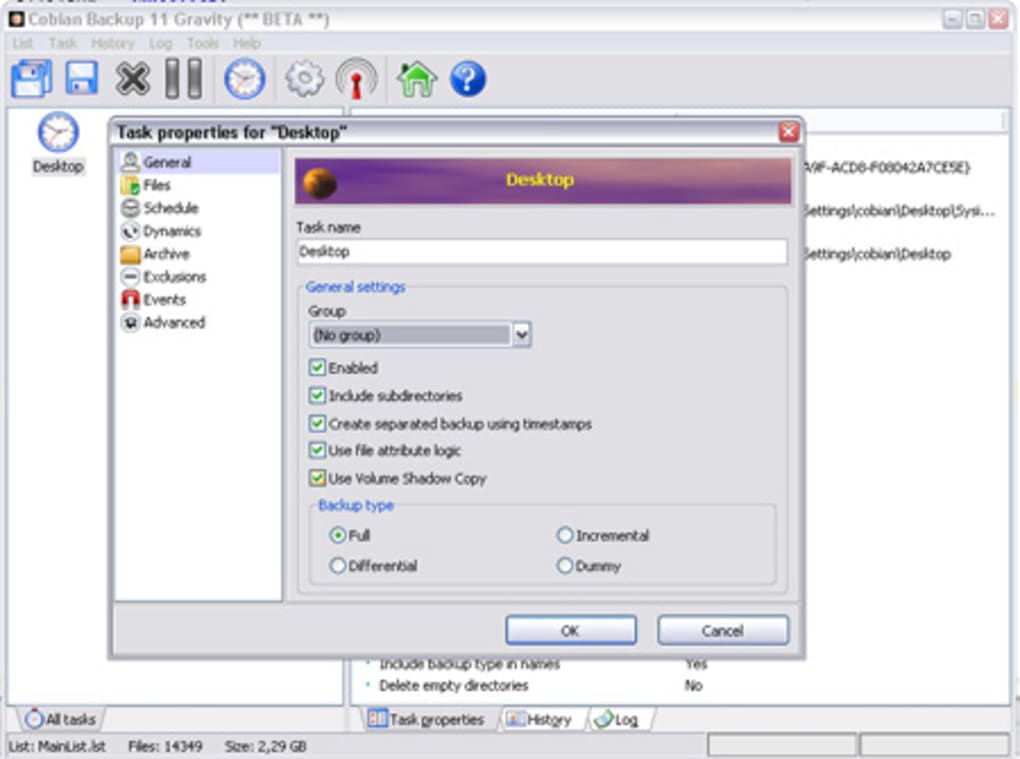
- Supports full, incremental and differential backup types.
- Runs as a Windows service or a regular application.
- Low CPU and RAM footprint; runs silently in the background.
- Optional compression (ZIP) and AES‑256 encryption for secure archives.
- Multiple destination support – local drives, network shares, FTP/SFTP, and cloud folders.
- Command‑line interface for advanced scripting and automation.
- Detailed logging and email notifications on success or failure.
- Backup verification to ensure data integrity after each run.
- Multilingual interface with community‑driven translations.
Installation Process
Installing Cobian Backup is straightforward. Download the latest installer from the official website, then run the .exe file with administrative privileges. The wizard guides you through language selection, license agreement, and installation folder choice. By default, the program installs to C:\Program Files\Cobian Backup, but you can customize this path if you prefer a different location or a portable setup. After installation, you are prompted to launch the configuration wizard, which helps you create your first backup job by selecting source folders, destination paths, and schedule settings. The wizard also offers an optional step to enable compression and encryption, allowing you to tailor security levels from the start. Once the initial job is saved, Cobian Backup automatically adds it to the task scheduler (or its own service) and begins running according to the defined timetable.
System Compatibility
Cobian Backup is built exclusively for the Windows platform, supporting Windows 10, Windows 11, Windows Server 2016/2019/2022, and legacy systems such as Windows 7 (with limited support). The application runs on both 32‑bit and 64‑bit architectures, though the 64‑bit version is recommended for better performance on modern hardware. Because it operates as a Windows service, it can also be deployed on headless servers, making it suitable for remote backup scenarios. While there is no native macOS, Linux, Android, or iOS version, the underlying backup concepts can be replicated on those platforms using alternative open‑source tools.
Pros & Cons
Pros
- Completely free with no hidden licensing fees.
- Lightweight; minimal impact on system performance.
- Highly configurable scheduling and backup types.
- Runs as a service, enabling unattended backups.
- Strong AES‑256 encryption and optional ZIP compression.
- Supports a wide range of destinations, including FTP and cloud folders.
- Command‑line support for power users and automation.
- Extensive logging and email notifications for monitoring.
Cons
- No native macOS, Linux, Android, or iOS client.
- Compression is optional and may require extra storage planning.
- Interface feels dated compared to modern cloud‑backup suites.
- Large files (>1 GB) can cause noticeable temporary lag during backup.
- Initial configuration can be overwhelming for absolute beginners.
Cobian Backup delivers a powerful set of features without demanding a subscription fee. Its ability to run as a Windows service makes it ideal for automated, unattended backups, and the optional encryption gives peace of mind for sensitive data. While the UI could benefit from a modern redesign and the lack of cross‑platform support limits its audience, the core functionality remains robust and reliable. For Windows users seeking a free, resource‑friendly backup solution, Cobian Backup is a top contender.
Frequently Asked Questions
-
Can Cobian Backup encrypt my backups?
Yes. Cobian Backup offers optional AES‑256 encryption, which can be enabled per backup job. This ensures that your files are stored securely, even on public network shares or external drives.
-
Is there a limit to the size of files Cobian Backup can handle?
The software can back up files of any size, but very large files (over 1 GB) may cause a short period of system lag while the data is being copied. This is typical for any backup solution that processes large streams of data.
-
Do I need an internet connection to use Cobian Backup?
An internet connection is only required if you choose a network destination such as FTP, SFTP, or a cloud‑synced folder. Local disk backups work entirely offline.
-
Can I run multiple backup jobs simultaneously?
Yes. Cobian Backup allows multiple concurrent jobs, but you should monitor CPU and disk usage if you schedule several intensive tasks at the same time.
-
Is there a portable version of Cobian Backup?
A portable edition exists, which can be run from a USB stick without installation. However, the portable version lacks service mode, so it cannot execute when the host computer is logged off.
Conclusion & Call to Action
Cobian Backup stands out as a free, reliable, and highly configurable backup solution for Windows users who value control over their data protection strategy. Its ability to operate as a background service, combined with optional encryption and compression, delivers a level of security typically found only in paid products. While the user interface may feel a bit dated and the lack of native support for non‑Windows platforms limits its universal appeal, the core functionality—lightweight performance, extensive scheduling options, and robust logging—makes it an excellent choice for both home and small‑business environments.
If you’re ready to secure your files without spending a dime, download Cobian Backup today and start creating automated backup jobs in minutes. The installer is quick, the learning curve is manageable, and the peace of mind that comes from knowing your data is safely duplicated is priceless. Click the button below to get the latest version and begin protecting what matters most.
Guides & Tutorials for Cobian Backup
How to install Cobian Backup
- Click the Preview / Download button above.
- Once redirected, accept the terms and click Install.
- Wait for the Cobian Backup download to finish on your device.
How to use Cobian Backup
This software is primarily used for its core features described above. Open the app after installation to explore its capabilities.
User Reviews for Cobian Backup 0
No reviews found





